
Exposed 2 - Guess who never?
MobiStack DigitalTrivia
4.71.00 Reviews
- Version
- 1.9.0
- Installs
- 10.00K
- Age Rating
- Teen
Screenshots
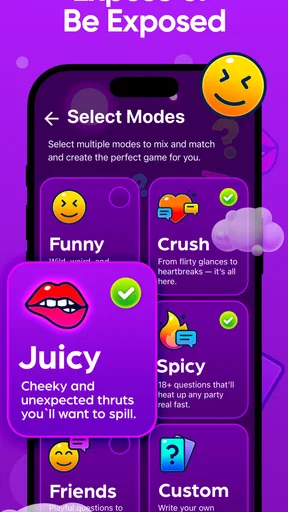
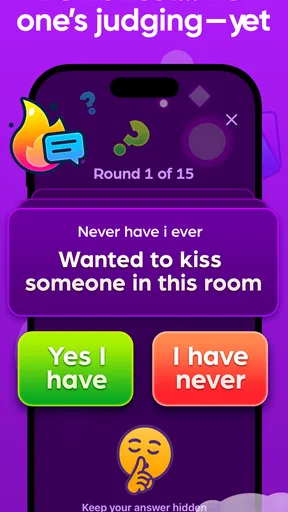
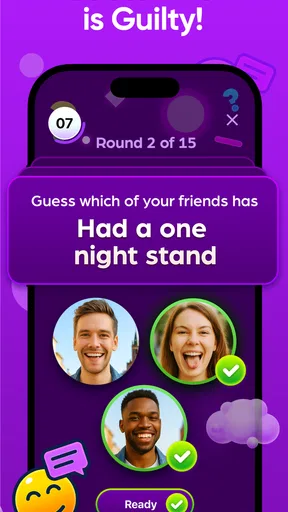
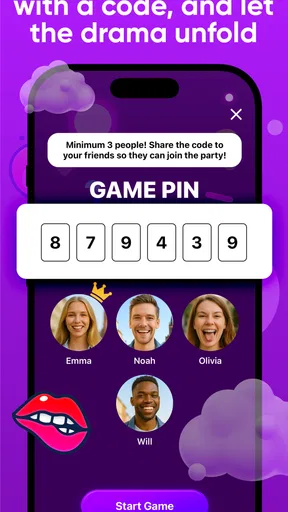
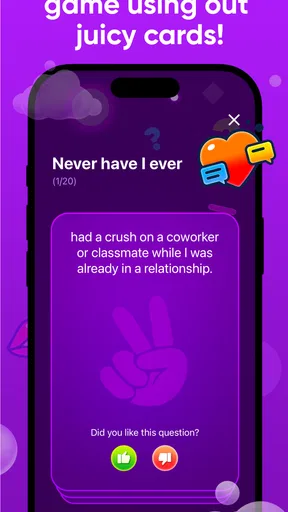
Our Review of Exposed 2 - Guess who never?
 Analysis by Appyee
I tried Exposed 2 - Guess who never? as the kind of trivia party game you bring out when a group wants something quick, personal, and a little mischievous. Its central appeal is easy to understand: instead of testing obscure knowledge, it turns the people in the room into the subject of the game. That makes it much more social than a conventional quiz, but it also means the quality of the experience depends heavily on who is playing, how comfortable everyone feels, and whether the group is ready for questions that can expose habits, opinions, or embarrassing stories.
At its best, this free game from MobiStack Digital gives a gathering an instant talking point. At its weakest, it can create awkward pauses before anyone has even started. I found that difference important. The app is not simply something to open and play alone; it works as a tool for a particular kind of group conversation. If your friends enjoy teasing one another and can read the room, it has a clear purpose. If your group prefers private, predictable, or strictly competitive games, a standard trivia app may be a better fit.
Why players can get stuck before the first round
The biggest practical hurdle is not learning complicated rules. It is getting people to agree on the mood of the session. A “never have I ever” style game can move from harmless jokes to sensitive subjects very quickly, especially when players are tired, drinking, or trying to impress one another. I would decide on a simple boundary before opening it: anyone can skip a prompt, and nobody has to explain a personal answer. That small agreement does more for the experience than trying to force every person to participate in every question.
It also helps to choose the right group size. With only two people, the game may feel more like a conversation prompt than a party game, because every question points directly at one of you. With a larger group, reactions become funnier and the attention is spread around, though quieter players can disappear if the most confident people answer first. I would keep the phone in a central place and make sure everyone can see it rather than passing it rapidly from hand to hand.
Another common source of friction is expecting a traditional trivia format. This is categorized as a trivia game, but it is not the sort of experience where you study facts and compare scores in the usual way. The entertainment comes from recognition, accusation, surprise, and storytelling. Someone who installs it looking for general-knowledge questions may think it lacks depth, while someone looking for a social icebreaker may find that the personal format is exactly the point.
The store summary presents it as a way to expose friends, and that description captures the tone without explaining the responsibility that comes with it. I would not use it as the first activity at a formal event or with people who have just met unless the prompts are handled gently. It is more natural after the group has already started talking, when the game can add momentum instead of carrying the entire evening.
Start with the group, not the screen
My most useful preparation tip is to identify the people who should probably sit this one out. That is not a criticism of the game. A personal party format is simply not comfortable for everyone. A guest who dislikes being singled out, a younger player in a mixed-age gathering, or someone dealing with a sensitive subject may prefer to watch or choose another activity. The content rating is Teen, so I would still treat the game as something that needs adult judgement about the setting and the people present.
The game is free to install, which makes it easy to suggest without asking the group to spend money first. However, optional in-app purchases range from $7.99 to $34.99 per item. I would treat those purchases as a later decision rather than part of the setup. Start with the free experience, see whether your group actually returns to it, and only then consider spending. A party game has little value if everyone enjoys it once but does not want another session.
Its audience numbers suggest that it has already found a modest group of interested players: the listing shows over 10K installs and an average rating of 4.7 from around 305 ratings. I see that as encouraging, but not as proof that it will suit every social circle. A highly rated party game can still fail in a quiet family gathering, just as an ordinary-looking game can become hilarious with the right friends.
Setup checks that prevent avoidable frustration
Before blaming the game for a rough start, I would check the basics. The current version is 1.9.0, and the game requires Android 8.1 or later. That requirement is not especially demanding, but older phones can still behave differently from newer ones, particularly if storage is nearly full or many apps are open in the background. On iPhone or iPad, I would likewise make sure the operating system and available storage are not creating a separate problem before judging the game itself.
Give the installation a moment to finish completely, then close other demanding apps and reopen the game. If a screen appears frozen, the safest first steps are ordinary ones: check the device connection, restart the app, and restart the phone if necessary. I would avoid repeatedly tapping the same control, because that can make a delayed response look like multiple inputs when the screen catches up.
A stable connection is especially worth checking around anything that loads from outside the initial screen. I would not assume every pause means the game is broken. Switching between a weak mobile signal and crowded Wi-Fi can interrupt loading, and a temporary network problem may resolve after reconnecting. If other apps are also struggling to load content, the wider connection is the more likely culprit.
Sound deserves its own check because a party game can seem unresponsive when the real issue is muted audio. I would raise the media volume, confirm that silent or focus modes are not interfering, and test the phone with another app. Even when the game remains playable without sound, missing audio can make players think an answer or transition has not registered.
For a shared session, I would also prepare the physical space. Keep the display clean, place the phone where the whole group can read it, and agree on who handles it. Passing a device after every prompt can interrupt the rhythm and create accidental taps. One person acting as the host usually produces a smoother round, while everyone else concentrates on reacting and telling stories.
Make the first session deliberately easy
I would not begin with the most revealing prompts, even if the group is enthusiastic. Start with questions that invite harmless admissions and let people learn how the room reacts. This creates a useful feedback loop: players discover whether the group laughs, debates, or becomes uncomfortable, and the host can adjust the pace accordingly. The aim is not to complete every prompt as quickly as possible; it is to keep people talking after each one.
There is also a practical difference between playing in a living room and playing in a noisy public place. In a café or crowded venue, people may miss the wording and answer based on guesses. That weakens the social part of the game because reactions depend on everyone understanding the same prompt. I would use it somewhere with enough quiet for the whole group to hear, even if the gathering itself is casual.
If a player does not understand what to do, explain the response in ordinary language before moving on. Do not let the app’s short format pressure the group into pretending. A few seconds spent clarifying the prompt is better than having several people respond differently and then arguing about what counted.
Recovering the flow when a round goes wrong
When the game stops feeling lively, I would first change the pace rather than immediately reinstalling it. A long chain of prompts can become repetitive, particularly if the same two people dominate every response. Let the host pause after an interesting answer, invite a short story, and then continue. The app works best when each screen is a springboard for conversation rather than a command to rush toward the next one.
If the group becomes too competitive, remove the pressure to prove anything. This is not where I would invent a complicated scoring system. The more rules you add, the more the session starts to resemble a conventional quiz and the less natural the personal format becomes. A simple turn-taking order is usually enough to stop interruptions without turning the evening into administration.
For a mixed group, I would use a “soft answer” approach. A player can respond generally, laugh it off, or pass without giving details. That keeps the game social while avoiding the false choice between revealing something private and refusing to play. It is a particularly useful compromise when friends know one another well but not everyone has the same boundaries.
Technical recovery should be equally simple. If a prompt does not advance, wait briefly, check whether the tap registered, and try once more. If the entire app is unresponsive, close it and reopen it. If the issue repeats, restart the device and check that the game is running its current version. I would not clear app data casually during a live party, because that can create a new setup problem and may remove local progress or preferences if the app uses them.
When purchases are involved, patience matters. A delayed purchase confirmation is not a reason to tap the buy control repeatedly. Check the device’s purchase history or account status first, then follow the platform’s normal support route if needed. Since individual items can cost from $7.99 up to $34.99, I would be especially careful to confirm what is being selected before approving anything.
Use the phone as a host, not the host as a technician
The most effective workflow I found is to assign one person three small jobs: read the prompt aloud, watch for anyone who wants to pass, and keep the session moving. That person does not need to be the funniest player or the owner of the phone. Their role is simply to protect the rhythm. If the host is also trying to answer every question, monitor purchases, fix connection issues, and settle arguments, the game can feel disorganized even when the app is working normally.
Another useful adjustment is to stop while the energy is still good. Because the format is easy to restart later, there is no need to exhaust every prompt in one sitting. Ending after a particularly funny or surprising exchange leaves the group with a better impression than continuing until responses become automatic. This is one of the clearest differences between a social prompt game and a conventional trivia app with rounds, levels, or a score to complete.
When the app is not the cause of the problem
Some negative sessions are really mismatches between the game and the group. If nobody wants to share personal experiences, no amount of troubleshooting will make this format work. A general-knowledge quiz is better for players who want clear right and wrong answers. A word game may be better for a family that wants competition without personal disclosure. A board game may be better when people want a structured evening with defined turns and objectives.
I would also skip this game if the gathering includes people who do not know one another well and there is no trusted host. The prompts may expose differences in humour, privacy, and social confidence before the group has built enough trust to handle them. In that situation, a neutral icebreaker with team-based answers is safer and more inclusive.
It is not ideal for someone looking for a solo experience either. Even though you can open and browse a game by yourself, its value comes from the reactions of other people. If you want to fill a commute or test your own knowledge, a single-player trivia title will give you more to do and a clearer sense of progress.
Device limitations can matter too. A phone that struggles with basic apps, has very little free storage, or is running an outdated system may produce crashes that are unrelated to the game’s design. Since the minimum supported Android version is 8.1, owners of older devices should check compatibility before planning a session around it. On any platform, a quick test at home is smarter than discovering a problem after everyone has arrived.
The Teen rating is another reason to choose the audience carefully. I would not assume that a rating alone makes every prompt suitable for every teenager or adult group. The tone of a personal admission game can be more important than the label, so the host should be prepared to skip anything that feels inappropriate for the people present.
What the rating tells me, and what it does not
The 4.7 average is a strong sign that many current players enjoy the concept, but ratings for a social game are naturally shaped by the reviewer’s friend group. Someone may love it because their circle turned one prompt into a long-running joke; another person may dislike the same app because their group found the questions uncomfortable. I read the rating as evidence of appeal, not a guarantee of a universally smooth party.
The developer, MobiStack Digital, has kept the product positioned around a direct social idea rather than presenting it as a broad trivia platform. That focus is a strength when you want a specific kind of interaction. It is also a limitation if you expect a large range of modes, serious knowledge testing, or a carefully structured progression system. I would choose it for the conversation it creates, not for depth in the traditional quiz sense.
My practical verdict after using it with real groups
I recommend Exposed 2 - Guess who never? to friends who enjoy playful honesty and can respect a pass. It is quick to understand, free to try, and more memorable than many ordinary quiz games because the answers come from the people sitting beside you. A good session can turn a quiet evening into a chain of stories, especially when the host resists rushing and lets the surprising answers breathe.
My recommendation comes with a clear condition: set expectations before starting. Decide who wants to play, agree that passing is acceptable, keep the phone in one person’s hands, and test the app before the event if the device is old or the connection is unreliable. Those steps address the most likely friction without pretending that technical fixes can solve a social mismatch.
The game is currently on version 1.9.0, was released on May 19, 2025, and is free with optional purchases. Those details make it easy to experiment without a financial commitment, but the higher-priced items mean I would avoid impulse buying during a lively party. Try the basic session first and judge whether your group actually wants more content before spending anything.
In the end, I see this as a focused party prompt game rather than a complete trivia replacement. Choose a standard quiz when you want knowledge, scores, and dependable structure. Choose this one when the real subject is your friends and the best answer is likely to produce a laugh, a confession, or a story. Its success depends less on technical complexity than on thoughtful hosting, and for the right group, that is exactly why it works.
Verdict
Strengths of Exposed 2 - Guess who never?
- Quick, simple rounds that are easy to start with friends.
- Funny prompts encourage conversation and unexpected revelations.
- Works well for parties, dates, and casual group gatherings.
- Minimal setup makes it accessible to players of different ages.
- A good icebreaker when the group already knows each other.
Limitations of Exposed 2 - Guess who never?
- Some prompts may feel repetitive after several rounds.
- The experience depends heavily on having an engaged group.
- Certain questions can feel awkward or too personal for some players.
- Limited appeal if you prefer competitive games or clear objectives.
- May require in-app purchases or ads for full content access.
Similar Picks in This Category
View All
Millionaire 2026 Quiz & Trivia
Quiz & Trivia Games by Submarine Apps4.5

Brain Test 2: Tricky Stories
Unico Studio4.7

Trivia Crack: Brain Quiz Games
etermax4.4

QuizzLand. Quiz & Trivia game
Quiz & Trivia Games by Mno Go Apps4.8

Brain Test: Tricky Puzzles
Unico Studio4.7

Logo Quiz
bubble quiz games4.5
Frequently Asked Questions
What is Exposed 2 - Guess who never?
Exposed 2 - Guess who never? is a social party game built around revealing surprising facts, habits, and experiences among friends. Players answer prompts, guess who in the group matches a statement, and react to the results. It is designed for casual gatherings and works best when everyone is comfortable participating honestly and respectfully.
How do you play Exposed 2 - Guess who never?
After starting a game, players typically take turns reading or responding to statements such as “Who has never…?” The group then chooses the person they believe fits the prompt, with the app helping organize the rounds and keep the pace moving. The exact flow may vary by mode, so reviewing the in-app instructions before playing is recommended.
Is Exposed 2 - Guess who never? suitable for children?
Parents should check the game’s age rating and the content of the available question packs before allowing children to play. Because the experience focuses on personal revelations and social guessing, some prompts may be intended for teenagers or adults. It is also wise for an adult to supervise younger players and skip any question that feels inappropriate or uncomfortable.
Can Exposed 2 - Guess who never? be played offline or without an account?
The game is primarily intended for local, face-to-face play, so many rounds may be possible without creating a public profile or using a competitive online service. However, certain features, updates, advertisements, or content packs can depend on the device’s internet connection. Requirements may differ between Android and iOS, so check the store listing and app permissions before downloading.
Is Exposed 2 - Guess who never? free to download?
The app’s download price and available purchases can vary by platform, region, and version. Even when the initial download is free, the game may include advertising, optional question packs, subscriptions, or other in-app purchases. Before installing, review the Google Play or App Store listing for current pricing, purchase details, privacy information, and any restrictions that could affect your group’s experience.
Play our best games!


